
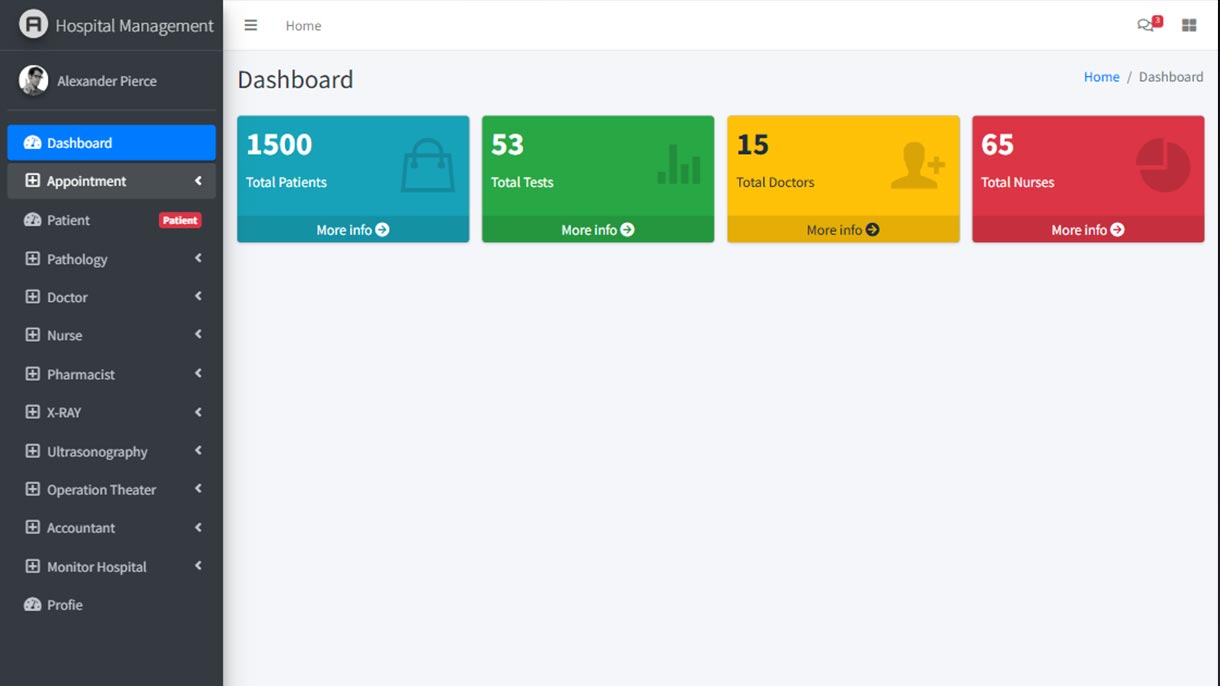
Hospital Management System HTML Template
- Date 2019
- Services Hospital Management System
That’s wonderful! Creating a recipe HTML template involves focusing on aesthetics, functionality, and user experience to ensure it stands out in the market. Here’s a detailed guide to help you deliver a high-quality recipe HTML template:
Key Features for a Recipe HTML Template
- Responsive Design:
- Ensure the template is fully responsive, providing a seamless experience on mobile, tablet, and desktop devices.
- Test the template on various browsers to ensure compatibility.
- User-Friendly Navigation:
- Implement a clear and intuitive navigation menu.
- Include a search bar with filters for ingredients, cuisine type, preparation time, difficulty level, etc.
- Recipe Listings:
- Design a clean and attractive layout for recipe listings.
- Include essential details such as recipe name, thumbnail image, rating, preparation time, and a short description.
- Recipe Detail Pages:
- Create detailed pages for each recipe, featuring step-by-step instructions, ingredients, cooking time, and nutritional information.
- Incorporate high-quality images and videos to enhance the user experience.
- Print and Save Options:
- Allow users to easily print recipes or save them to their accounts for future reference.
- Provide options to share recipes on social media platforms.
- User Reviews and Ratings:
- Implement a system for users to leave reviews and rate recipes.
- Display user reviews and ratings prominently on the recipe detail pages.
- Categories and Tags:
- Organize recipes into categories (e.g., breakfast, lunch, dinner, desserts) and tags (e.g., vegetarian, gluten-free, quick meals).
- Make it easy for users to browse and discover new recipes.
- Ingredient-Based Search:
- Include a feature for users to search recipes based on available ingredients.
- Suggest recipes based on common or leftover ingredients.
- Blog and Articles Section:
- Provide a section for blog posts, cooking tips, and culinary articles.
- Ensure easy management and updating of content.
- User Accounts and Dashboards:
- Allow users to create accounts, save favorite recipes, and manage their profile.
- Include a dashboard for users to view their saved recipes and contributions.
Quality Assurance
- Clean and Well-Documented Code:
- Write clean, modular, and well-documented HTML, CSS, and JavaScript.
- Use best practices for coding, ensuring maintainability and ease of updates.
- SEO Optimization:
- Use semantic HTML tags to enhance SEO.
- Optimize images, scripts, and stylesheets for faster loading times.
- Performance Optimization:
- Minimize and compress CSS, JavaScript, and images.
- Implement lazy loading for images and other heavy resources to improve page speed.
- Accessibility Compliance:
- Ensure the template is accessible to users with disabilities by following WCAG guidelines.
- Include features like keyboard navigation and screen reader support.
Documentation and Support
- Comprehensive Documentation:
- Provide detailed documentation to help users set up and customize the template.
- Include instructions on installation, customization, and troubleshooting.
- Customer Support:
- Offer support channels such as email, forums, or a dedicated support portal.
- Be responsive to user inquiries and provide timely assistance.
Marketing and Distribution
- ThemeForest Submission:
- Ensure the template meets all of ThemeForest’s submission requirements, including quality, documentation, and support standards.
- Review ThemeForest’s guidelines carefully to avoid common pitfalls.
- Promotion on SolverWP:
- Feature the template prominently on SolverWP with detailed descriptions, high-quality screenshots, and feature lists.
- Use SEO best practices to attract organic traffic to the listing.
- Social Media and Email Campaigns:
- Promote the template through social media channels and targeted email campaigns.
- Highlight the unique features and benefits to attract potential buyers.
Example Template Sections
- Homepage:
- Hero section with featured recipes and a search bar.
- Popular and latest recipes sections.
- Links to categories and special collections (e.g., holiday recipes).
- Recipe Listings Page:
- Grid or list view of recipes with filters and sorting options.
- Pagination for easy navigation.
- Recipe Detail Page:
- Detailed recipe information with images and step-by-step instructions.
- User reviews and ratings.
- Related recipes section to encourage further exploration.
- Blog and Articles Page:
- List of blog posts with images and excerpts.
- Categories and tags for easy browsing.
- User Dashboard:
- User profile management.
- Saved recipes and contributions.
- Account settings.
By focusing on these elements, your recipe HTML template will be visually appealing, highly functional, and user-friendly, making it an attractive option for potential buyers on both ThemeForest and SolverWP.
4o
I developed a hospital management system in 2019. I have used html, css, css3, JavaScript, jquary, fontawesome, Bootstrap and many more jquary plugin.
Developing a hospital management system is a significant achievement. Here’s a comprehensive guide to ensure your hospital management system (HMS) is robust, user-friendly, and effective.
Key Features of a Hospital Management System
- Patient Management:
- Registration: Simplified patient registration process.
- Appointments: Scheduling, rescheduling, and cancellation of appointments.
- Medical Records: Detailed medical history and treatment records.
- Doctor Management:
- Profiles: Detailed profiles for doctors including specialties, schedules, and contact information.
- Scheduling: Manage doctors’ schedules and availability.
- Staff Management:
- Profiles: Detailed profiles for nurses, administrative staff, and other employees.
- Scheduling: Shift management and attendance tracking.
- Billing and Invoicing:
- Billing: Automated billing for services rendered.
- Invoices: Generation and management of invoices.
- Payments: Integration with payment gateways for processing payments.
- Inventory Management:
- Stock Tracking: Track medical supplies and equipment.
- Notifications: Alerts for low stock and expired items.
- Reports and Analytics:
- Reports: Generate various reports (patient visits, financials, inventory, etc.).
- Analytics: Analyze data for insights and decision-making.
- Pharmacy Management:
- Inventory: Manage pharmacy inventory and prescriptions.
- Sales: Track sales and billing.
- Lab Management:
- Tests: Manage lab test requests and results.
- Reports: Generate lab reports and share them with doctors and patients.
- User Management:
- Roles and Permissions: Define roles and manage access permissions.
- Profiles: Manage user profiles and access levels.
- Notifications and Alerts:
- Reminders: Send reminders for appointments, medication, and follow-ups.
- Alerts: System alerts for critical updates and actions.
Technologies Used
- Frontend:
- HTML/CSS/CSS3: Structure and styling of the system.
- JavaScript: Interactivity and dynamic content.
- jQuery: Simplified JavaScript for DOM manipulation and AJAX requests.
- Bootstrap: Responsive design and layout.
- FontAwesome: Icons for UI elements.
- Backend (not mentioned, assuming you used a backend language and database):
- PHP/Node.js/Python: Server-side scripting.
- MySQL/MongoDB/PostgreSQL: Database management.
- Express.js/Django/Laravel: Backend frameworks for handling requests and responses.
Quality Assurance
- Clean and Maintainable Code:
- Follow coding standards and best practices.
- Use comments and documentation for clarity.
- Responsive Design:
- Ensure the system is accessible on various devices (desktops, tablets, smartphones).
- Test across multiple browsers for compatibility.
- Performance Optimization:
- Optimize images, CSS, and JavaScript for faster loading times.
- Use lazy loading for non-critical resources.
- Security:
- Implement SSL for data encryption.
- Use secure authentication and authorization mechanisms.
- Protect against common vulnerabilities like SQL injection and XSS.
- User Experience (UX):
- Ensure a user-friendly and intuitive interface.
- Use feedback and testing to improve usability.
Deployment and Maintenance
- Hosting:
- Choose a reliable hosting provider.
- Ensure the server can handle the expected load and traffic.
- Version Control:
- Use version control systems like Git for managing code changes.
- Regularly update and maintain the codebase.
- Backup and Recovery:
- Implement regular backups of the database and system files.
- Plan for disaster recovery and data restoration.
- Support and Updates:
- Provide ongoing support and maintenance.
- Regularly update the system to fix bugs and add new features.
Marketing and Distribution
- Documentation:
- Provide comprehensive user manuals and technical documentation.
- Include installation guides and FAQs.
- Demos and Tutorials:
- Offer live demos or video tutorials to showcase the system’s features.
- Provide step-by-step guides for common tasks.
- SEO and Online Presence:
- Optimize the system’s website for search engines.
- Use social media and online forums to promote the system.
- Feedback and Improvement:
- Collect feedback from users to identify areas for improvement.
- Regularly update the system based on user feedback and technological advancements.
By focusing on these aspects, you can ensure that your hospital management system is not only functional and efficient but also user-friendly and scalable. This approach will help your client successfully market and deploy the system.